
 By
·
5 minute read
By
·
5 minute read
Key Takeaway
FormDr is a strong HIPAA-ready form builder with a deep feature set, especially for practices that care about workflow automation, integrations, and operational efficiency. Pricing starts at $39/mo on the Essential plan, but most growing teams will end up on a quote-based tier once they need more users, integrations, or support. The real decision is less about cheapest plan and more about what level of complexity you actually need, plus how much you value design control. If you want operational horsepower, FormDr can be a great fit. If your priority is a more polished, branded intake experience with deeper control over layout and styling, it may be worth considering an alternative like Form Vessel.
Table of Contents
The following information is based off of publicly available information found on FormDr's website and is current as of January, 2026.
FormDr Pricing At a Glance
FormDr pricing starts at $39/mo on the annual Essential Plan. Other tiers require a sales quote. Check out highlights of each plan below:*
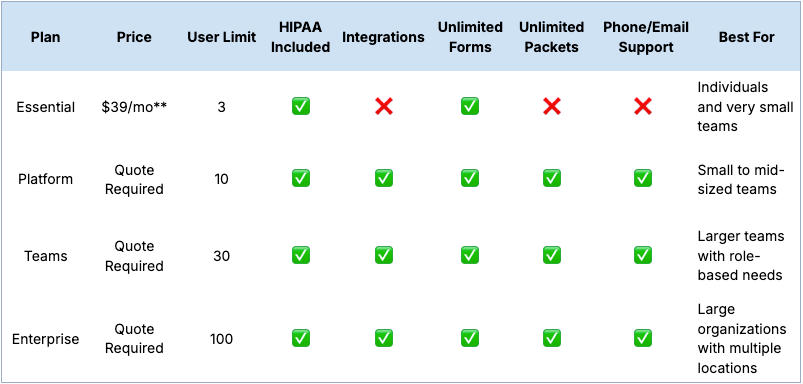
** When billed annually
FormDr Pricing Full Breakdown
FormDr Essential Plan
The Essential Plan is advertised as a self-service plan that is ideal for small businesses. It costs $39/mo for the annual plan or $59/mo when billed monthly. This tier includes unlimited HIPAA compliant forms, but is the only one that does not include unlimited packets and synced forms (you receive 5 of each). This tier also gives you all of the basic elements and custom branding, as well as text message invitations and appointment reminders.
Not included in this tier are FormDr's patient engagement add-on features, like the centralized inbox, online scheduling, mass messaging, and more. Additionally, accounts are capped at 3 users and are unable to set user or team permissions.
FormDr Platform Plan
The Platform Plan is their most popular, and includes a dedicated account manager, as well as everything in the essential tier. You also get unlimited packets and synced forms in this tier. This plan also allows FormDr to integrate with popular EHR and EMR systems, as well as scheduling, payment, and storage applications. The user limit is increased to 10 and admins are now able to set users permissions as well. You also get access to FormDr's support team for phone and email support.
This plan does not include some deeper team management features that would be useful for larger teams like team-level permissions or a master administrator account.
FormDr Teams Plan
The Teams Plan includes all of the features in the platform plan, and is designed for larger organizations who need more detailed permissions. This is the cheapest plan that unlocks everything, including the team management features. You can also have up to 30 users on this tier.
FormDr Enterprise Plan
In terms of features, the Enterprise Plan and the Teams Plan are identical. The main difference is that the enterprise tier is meant for much larger organizations. It supports up to 100 users, and has much higher caps on monthly submissions, exports, invites, form views, and more.
Pricing for the Platform, Teams, and Enterprise Plans is not publicly available. Contact the FormDr sales team for more info.
FormDr Patient Engagement Add-on
FormDr also offers an optional patient engagement add-on for their platform, teams, and enterprise plans. This helps you interact directly with your patients through the FormDr system and includes features like a centralized inbox, online scheduling, mass messaging, workflow automation, and more.
Pricing for the FormDr Patient Engagement Add-on is not publicly available. Contact the FormDr sales team for more info.
What Each Plan Is Best For
The best FormDr plan for your team comes down to team size, workflow complexity, and your need for integrations.
Essential Plan (Best for: very small teams)
The Essential Plan is best for individuals or very small practices that want to digitize intake quickly without needing complex workflows.
This tier makes the most sense if you:
- only need a few users
- want HIPAA-ready form collection without extra operational layers
- don’t require EHR/EMR integrations
- want a straightforward way to send and collect patient paperwork online
If your practice is early in the digital intake journey, this is a solid starting point.
Platform Plan (Best for: small to mid-sized practices)
The Platform Plan is FormDr’s most popular option and is best for teams that want more operational support and connectivity.
This tier is a good fit if you:
- want integrations with EHR/EMR systems or other tools
- want a more scalable workflow for higher patient volume
- need support access (phone/email) and account management
- have multiple staff members involved in intake and follow-up
If intake is a core operational workflow (not just “forms”), this tier is usually where practices start to see meaningful time savings.
Teams Plan (Best for: growing orgs with role-based needs)
The Teams Plan is best for larger teams that need stronger permissioning and more structure.
This tier makes sense if you:
- have multiple departments or teams touching intake
- need more detailed access control and oversight
- want a system that can scale across multiple staff roles
- are trying to standardize intake workflows across a larger operation
This is the first tier that really feels designed for organizations (not just small practices).
Enterprise Plan (Best for: large organizations and multi-location groups)
The Enterprise Plan is best for large organizations that need high user limits and more robust scaling.
This tier is usually the right fit if you:
- manage multiple locations
- have enterprise-level admin needs
- need higher caps across submissions, exports, invites, and usage
- want to roll out standardized workflows across a large group
At this level, you’re usually buying a system that supports organizational consistency and governance, not just form creation.
Hidden Cost Checklist (What to Confirm Before You Commit)
FormDr pricing is fairly clear at the entry level, but like most healthcare intake tools, the real cost depends on how your practice plans to use it.
Before choosing a plan (or signing an annual contract), it’s worth confirming a few things so there are no surprises later.
Here’s a quick checklist to run through:
☐ Billing structure: annual vs monthly pricing, and how much you save by committing
☐ Quote-based tiers: what’s actually included in the quote for Platform/Teams/Enterprise
☐ User limits: how quickly you’ll outgrow the user cap (especially in multi-provider practices)
☐ Submission/usage caps: limits on submissions, exports, invites, or views
☐ Integrations: which integrations are included vs optional, and whether setup is assisted
☐ EHR/EMR connectivity: whether your specific system is supported (and what the workflow looks like)
☐ Patient engagement add-on: what it includes, what it costs, and whether it’s required for key workflows
☐ Support level: whether phone support is included, and what response times look like
☐ Workflow automation limits: whether automations are capped or gated behind higher tiers
☐ Data export and storage: export format options, retention, and storage integrations
☐ Multi-location setup: whether location-level separation is supported (if applicable)
☐ Permissions and access controls: how granular role-based permissions get as you scale
☐ Implementation time: whether onboarding is self-serve or requires a rollout process
In healthcare, the most expensive intake tool is the one you outgrow too quickly. A little planning upfront can save you a lot of rework later.
Alternatives to FormDr
FormDr is a solid option if you want a HIPAA-ready form builder that leans into operations. It’s built for teams that care about integrations, workflow automation, and having a lot of capabilities under one roof.
But some practices are optimizing for something else.
If your top priority is the patient-facing experience, FormDr can start to feel like you’re working around the product instead of shaping it. You can absolutely build effective forms, but getting the intake experience to look and feel polished can take more effort than you’d expect.
It’s the same story if speed matters. A feature-dense platform is great when you need the full system, but if you just want to ship a clean intake flow quickly, the extra surface area can slow you down. For some teams, a simpler setup with stronger control over layout and styling ends up being the better trade.
Form Vessel could be a strong FormDr alternative. It’s designed for teams that want deeper control over how the form actually looks and behaves, without turning the project into custom dev. The goal is a more branded, modern intake experience that you can launch quickly, while still supporting HIPAA-regulated workflows with safeguards like access controls, encryption, and audit logging.