
 By
·
5 minute read
By
·
5 minute read
Key Takeaway
Patient forms play a critical role in both patient experience and healthcare operations, but traditional paper workflows often slow practices down and introduce avoidable risk. Digital patient forms can improve efficiency, accuracy, and visibility while supporting HIPAA obligations when implemented thoughtfully. The key is choosing a solution that balances strong security safeguards with ease of use, so staff can adopt it consistently without creating new compliance gaps.
Table of Contents
Disclaimer: This article is for informational purposes only and does not constitute legal advice. Always consult a qualified attorney or compliance professional when interpreting HIPAA regulations.
Patient forms are everywhere in healthcare. Whether it’s a basic intake packet, a financial form, or something more complex, they serve as a pillar of effective patient care. Considering their importance in enabling providers to offer exceptional care, it can seem like a mystery how form workflows have struggled to keep up with the modern world.
However, the answer is much simpler than most realize. It’s all about peace of mind. Physical patient forms have served the healthcare industry faithfully and they have always worked. It’s the same reason that most people don’t upgrade their iPhone every single year. Without tangible benefits that can be seen in an upgrade, good enough gets the job done like it always has.
With that in mind, it’s worth looking at the possible benefits of digital patient forms, common barriers to their adoption, and tools that can make the transition easier if it’s right for you.
Are Online Patient Forms Worth It in 2026?
The benefits of digital forms can be summed up in just a few words: efficiency, accuracy, and simplicity.
Efficiency
There are multiple ways a practice can utilize digital form workflows, and nearly all of them are likely to be more efficient than paper flows. For patient intake, the best option is for patients to be able to fill out their forms before their appointment. This allows them to show up at their appointment time, check in, and instantly be ready to go. No more clipboards and confusion.
For practices who don’t choose this route, or for patients who may forget to fill out their forms before arrival, digital flows can still save time. Whether they use their personal device or an office tablet, digital forms can help office staff by eliminating the need for manual transcription.
Accuracy
One of the biggest slowdowns with paper intake workflows is accuracy issues. Sometimes a patient might not understand which part of a paper form they’re required to fill out. Guided flows can help alleviate this.
Additionally, office staff no longer need to contend with flagging down patients for missing contact info as many digital form solutions offer validation for certain fields.
On top of that, the days of trying to decipher questionable handwriting can finally be over.
Those are just a few examples. Ultimately, digital forms can support greater accuracy and fewer operational headaches.
Simplicity
A hidden benefit of transitioning away from paper forms is the potential for simpler HIPAA compliance tasks. When it comes to PHI, it’s not as easy as finding a cabinet with some empty space. There are a lot of different tasks associated with the collection, storage, transfer, and destruction of physical PHI.
Digital forms don’t erase HIPAA obligations, but they can alter them into something that is easier to track and manage, thanks to automated audit logging and password protected accounts.
Common Adoption Barriers
Implementing any new system into a healthcare workflow can be challenging. When PHI is involved, it becomes even more difficult. This is why digital form solutions have two huge barriers to adoption.
HIPAA-Aligned Safety Features Are Necessary
HIPAA compliance can be daunting. Adding an entirely new piece to the puzzle often feels like it’s not worth it for many providers. This means new procedures are required, training is likely needed, and it can simply be difficult to verify if a new tool or system has the technical safety features to make compliance easier. When it comes to a form builder, that includes features like individual user authentication, access controls, audit logs, data encryption, and more.
The best way to overcome this barrier is by evaluating your vendors by their words and actions. The content they put out should not be designed to instill fear about multi-million dollar fines or make you feel like HHS will be knocking on your door because of a small mistake. Instead, they should educate you about best practices and provide helpful resources. They should also be clear about what their tool offers and what it can truly do for you, without making empty guarantees.
As for their actions, they should be able to backup everything they say! Anybody can say that a feature exists, but they should be able to prove it’s actually there. More importantly, they should be willing to enforce real obligations through a signed Business Associate Agreement (BAA).
Ultimately, finding a trustworthy vendor for a HIPAA compliant workflow is never an easy task, but your prospective options should be willing to work with you and make you feel safer, rather than putting you in the hot seat.
Ease of Use
This is another huge barrier that comes with new systems in healthcare because it can be a silent compliance killer even on systems that have all the right safeguards. The reason is simple: Safeguards reduce the risk of incidents, but they can’t prevent them entirely. This gets worse when the software is used incorrectly. When it’s hard to navigate or set up, your staff will typically do one of two things.
First, they might try to get around the difficulty in ways that inadvertently compromise security like sharing logins, leaving sessions open on a tablet, or exporting forms to a personal email or cloud drive for easier access. The second option is falling back on a legacy workflow that is often slower and harder to audit.
A healthcare system should not only protect sensitive data with reasonable and appropriate safeguards, but it should facilitate adoption by lowering the training and administrative burdens that come with implementing it. The safest system is the one your staff can use correctly and consistently.
A HIPAA Compliant Patient Form Builder Can Help
There are tons of digital form builders on the market. There are fewer that offer HIPAA-aligned safety features. Even fewer were built specifically for healthcare and handling PHI. While popular choices like Jotform and Google Forms may be able to get the job done in some cases, it usually involves extra setup or paying for enterprise tiers. For practices and providers looking for a quality option to upgrade their practice with digital patient forms, a purpose-built option is a great place to start.
This signals that HIPAA support is central to the software’s design, not an afterthought. It also means support and workflows that are tailored more specifically to healthcare rather than general purpose use.
Security Features for Digital Patient Forms
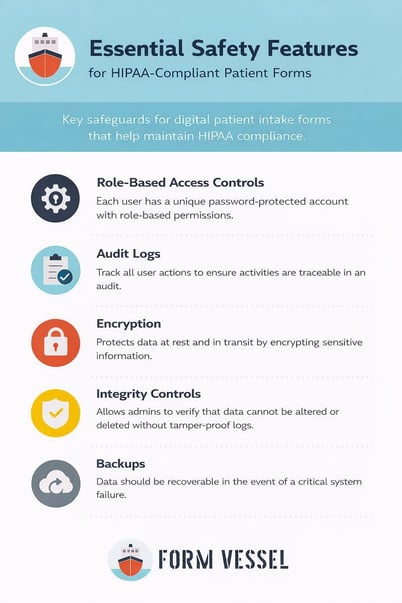
For practices that want digital forms without compromising on compliance, it’s not enough to simply look for a stamp that says HIPAA-safe. There are specific safeguards that should be implemented. Here are some of the most common security features that should be included:
- Role-based access controls. Each user should be able to have a unique password-protected account with role-based permissions.
- Audit logs. This pairs with individual accounts and ensures that all actions are easily traceable in the event of an audit.
- Data should be encrypted in transit and at rest to reduce the risk of cyberattacks.
- Integrity controls. Admins should be able to investigate changes and deletions through tamper-proof logs.
- Data should be recoverable in the event of a critical error.
These are just a few of the biggest security features that a quality form building tool should provide. It’s important to evaluate all of a software’s claims against your business’s unique needs. Your chosen vendor should also provide a signed business associate agreement (BAA).
Important Note: Patient form software should include HIPAA-aligned safety features, but this does not automatically guarantee compliance. These features can support your compliance goals, but there are still internal administrative tasks that must be completed.
Next Steps
If you think digital patient forms would be beneficial to your organization, you can begin your search for a solution that fits your needs. Before spending too much time on the fancy features a vendor might advertise, it’s important to ensure the safety features are reasonable and appropriate for your situation.
After that, the next priorities should be ease of use for you and your team and ensuring the form builder is powerful enough to create the forms you need. Following the guidelines in this blog are a great step in finding a quality option for digital patient forms in your practice.