
 By
·
5 minute read
By
·
5 minute read
Key Takeaway
HIPAA compliant forms can make a big difference for healthcare practices by improving intake efficiency and reducing the risk of mishandling PHI, but they are not a magic wand that guarantees compliance on their own. The real value of a HIPAA-ready form system is that it supports the technical safeguards HIPAA expects, like access controls, audit logging, encryption, and secure transmission, while making it easier for teams to adopt secure workflows. If you understand what counts as PHI, choose a platform that treats security as a baseline requirement, and pair it with strong internal policies and training, digital forms can be a powerful step toward smoother operations and stronger compliance.
Table of Contents
- Introduction
- What Makes a Form HIPAA Compliant (With Checklist)
- What Counts As PHI
- What a HIPAA Compliant Form Builder Can Do
- What a HIPAA Compliant Form Builder Can’t Do
- What’s Next?
Disclaimer: This article is for informational purposes only and does not constitute legal advice. Always consult a qualified attorney or compliance professional when interpreting HIPAA regulations.
HIPAA compliant online forms are becoming an essential piece of healthcare operations in 2026. Many practices are transitioning away from paper intake processes because the benefits of digital forms are too great to ignore. Practices that switch often gain more efficient appointment pacing, happier staff, satisfied patients, and in many cases, more revenue. That’s why so many HIPAA compliant form tools are showing up on the market.
With so many choices, it’s important to understand what HIPAA compliant forms can actually do for your practice, so you can avoid solutions that might overpromise and underdeliver. This blog will explain what goes into making a form HIPAA compliant, the nuance behind PHI when it comes to digital forms, and what HIPAA compliant form builders can and can’t do.
What Makes a Form HIPAA Compliant (With Checklist)
When people search for a HIPAA compliant form builder, what they usually want is a platform that helps them collect sensitive patient information without taking on unnecessary risk. The tricky part is that the phrase itself is misleading. No form builder can make your organization compliant on its own. Compliance is the result of how your team operates, how your systems are configured, and how PHI is handled across your entire workflow. A form tool can support that effort, but it can’t replace it.
That’s why the best way to evaluate a form builder is not by looking for a compliance stamp. It’s by looking at whether the platform supports the technical safeguards HIPAA expects, and whether those safeguards are treated as baseline requirements instead of premium add ons. Form builders interact with PHI constantly, which means the security foundations matter more than flashy features.
Here’s a simple checklist you can use when evaluating any HIPAA compliant form platform:
- Access controls to limit PHI visibility to the right roles
- Audit controls so activity and access are tracked over time
- Integrity controls to protect submissions from improper changes
- Authentication controls to ensure user access is properly verified
- Transmission security so PHI is protected when sent or shared
Access a more detailed checklist here.
You’ll often see HIPAA label these safeguards as required or addressable, which creates confusion. Addressable does not mean optional. It means the organization has to implement the safeguard, or document why an alternative approach is being used and acknowledge the risk involved. In practice, skipping addressable safeguards like encryption standards or automatic logoff is usually a red flag, especially for a tool that is directly responsible for collecting and storing PHI.
A truly strong form builder won’t claim to solve HIPAA. Instead, it will make intake easier, reduce the chance of mishandling PHI, and give your team the controls and visibility you need to build safer processes around your forms. That’s the real goal. You're not after a compliance label. You need a tool that strengthens your overall compliance program.
What Counts As PHI
HIPAA doesn’t treat all personal data the same. The category that matters is Protected Health Information (PHI), and understanding what falls into that bucket is one of the most important parts of building secure workflows. PHI is not just medical records. It includes any information that connects a person to healthcare services in a way that could reveal something about their health, treatment, or payment for care.
The easiest way to think about it is as a quick test. Information is very likely PHI when all of the following are true:
- It is created, received, stored, or shared by a covered entity or a business associate
- It can identify a specific person (directly or indirectly)
- It relates to the person’s care, payment for care, or health status (past, present, or future)
If those conditions are met, the safest assumption is that the data should be treated as PHI and protected using HIPAA safeguards.
This is where people get tripped up, because context matters. A piece of data that seems harmless on its own can become PHI the moment it’s tied to healthcare services. A form that collects medical history is obviously PHI, but even an appointment request form that only asks for a name and phone number is typically treated as PHI. It identifies the individual, it relates to future care, and it’s being handled within a healthcare workflow.
And forms aren’t the only risk. Tracking tools can create even more subtle disclosures, especially on medical websites, which is why it’s important to think beyond the form fields and understand how information moves through your entire system.
Disclaimer: If you’re unsure whether certain data qualifies as PHI, it’s worth consulting a compliance professional to evaluate your specific situation.
What a HIPAA Compliant Form Builder Can Do
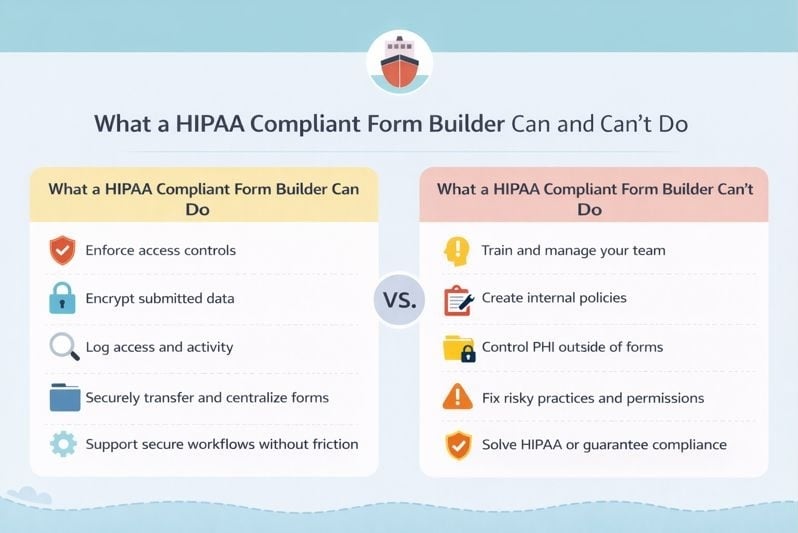
A quality form builder should make achieving compliance easier, not more confusing. The best platforms treat HIPAA aligned safeguards as baseline requirements instead of premium add ons, because if a system is collecting PHI, security and privacy can’t be an afterthought.
At a practical level, a HIPAA ready form builder can support your compliance program by implementing technical safeguards that protect PHI as it’s collected, stored, and accessed. That includes features like access controls, encryption, audit logging, and secure transmission. It can also reduce risk by giving your team a controlled environment to manage submissions, rather than relying on scattered tools or storage workflows that are harder to monitor.
Just as importantly, a form builder can make secure processes easier to adopt. If software is clunky or hard to use, people work around it. A strong platform should make it easy to build and maintain forms without requiring a developer, while still giving you enough flexibility to create a polished intake experience that patients are comfortable completing.
What a HIPAA Compliant Form Builder Can’t Do
Even the best form builder cannot guarantee compliance on its own. That doesn’t exist, and any platform that claims it does is creating a false sense of security. HIPAA compliance comes from how an organization operates, not from a single tool. Software can support the technical safeguards, but it cannot replace the physical and administrative work required to build a real compliance program.
A form builder can’t ensure your team is properly trained, that your internal policies are enforced, or that access is managed responsibly across every system that touches PHI. It can’t prevent someone from exporting data into an insecure location, sharing it improperly, or keeping it longer than necessary. And it can’t automatically correct weak processes like unnecessary access permissions, missing documentation, or inconsistent security reviews.
The goal of a HIPAA-ready form builder is not to solve HIPAA. The goal is to reduce risk and give your organization a stronger foundation for handling PHI. From there, compliance depends on how you configure your systems, how you train your team, and how seriously your organization treats the broader responsibilities HIPAA requires.
What’s Next?
If you think your practice could benefit from upgrading to HIPAA compliant digital forms, it’s important to find a solution that works well for your needs. The best way to do that is to try some out! Many offer free trials or interactive demos so you can get a better understanding for how they work and if they’re right for your team. Now that you know what to look for, you can make an informed decision that will set your practice up for success in your transition to a digital intake solution.