
 By
·
4 minute read
By
·
4 minute read
Key Takeaway
A real online intake packet is not a fillable PDF. It is a workflow that collects complete, structured data before the visit and reduces front desk work through better design and a clear rollout process. When you are evaluating tools like FormDr or Form Vessel, use these principles to compare options and choose an approach that supports your goals.
Table of Contents
- Why Paper Intake Has To Go
- What An Online Intake Packet Actually Is
- What To Include in the Packet
- Design Tips For Your Next Intake Packet
- Rollout and Adoption
- Final Thoughts
Clipboards create bottlenecks. Paper forms slow check-in, introduce errors, and force front desk teams to spend time retyping and fixing missing information. Online intake changes that experience. Patients can complete forms ahead of time, at their own pace, and practices receive more complete data before the appointment.
Digital intake reduces manual work for staff and keeps the schedule moving. This guide breaks down how to build an intake packet that maximizes efficiency for your front desk and makes the process easier for patients.
Why Paper Intake Has To Go
Paper intake served the medical world faithfully for many years, but “good enough” is no longer worth it now that digital forms are more accessible. We touched on a few issues briefly, but the real problem is that paper creates extra work at every step. Someone has to hand it out, explain it, collect it, check it for missing fields, and then manually type it into your system. That is time your team does not get back.
To be clear, paper intake will always have a place. It is a reliable backup when technology fails, and some patients will still prefer it. But its time as the primary option has passed. Practices that do not make the switch are choosing slower workflows, more avoidable errors, and a weaker check-in experience for patients and staff.
What An Online Intake Packet Actually Is
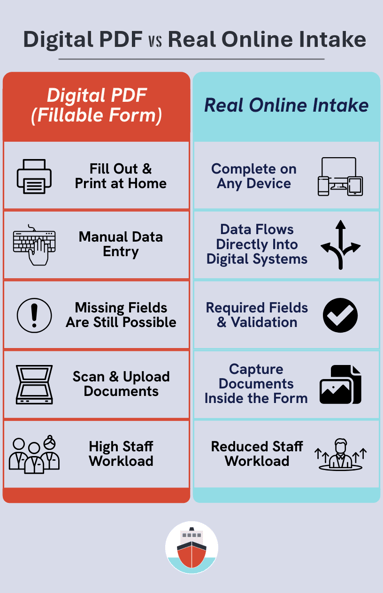
A lot of practices offer online fillable PDF intake packets. While these are more convenient than paper, they are not true online intake packets. In practice, they create many of the same problems. Information still has to be manually entered into the EHR, supporting documents still need to be scanned, and printouts can get left at home, which forces patients to fill out the same forms twice.
Some practices try to solve this by having patients email completed packets, but this introduces new issues. Email is not always secure. Compliant options do exist, but they require intentional setup. A standard Gmail account does not meet HIPAA safeguards.
A real online intake packet goes beyond a digital document. Patients complete forms digitally without printing, and the data flows directly into electronic systems. Front office staff do not have to retype information because it can integrate with the EHR or be uploaded via CSV. The result is cleaner data, fewer delays, and smoother check-in.
Many practices turn to dedicated intake platforms, including tools like FormDr and Form Vessel, when they realize fillable PDFs are not enough and they need a more complete intake workflow.
What To Include in the Packet
An effective intake packet collects everything your practice needs before the appointment, without overwhelming the patient. The goal is not to ask every possible question. It is to gather the right information upfront so staff are not chasing details later.
At a minimum, most intake packets include patient demographics, insurance information, medical history, and required consents. Many practices also add visit-specific questions, screening forms, and financial policy acknowledgments depending on specialty.
Rather than listing every possible field here, we put together a detailed intake packet checklist along with a free template you can use in your practice. It breaks down what to include, what can usually be skipped, and where practices tend to overcomplicate things.
Medical Intake Forms: Definition, Checklist, and Free Template
Design Tips For Your Next Intake Packet
A high-quality form builder should give you the flexibility to recreate your paper forms as digital intake packets. That is a solid starting point and it will speed things up for your team. However, a one-to-one digitized version of a paper packet is not always the best experience for patients.
Paper layouts work because you can scan the whole page at once. Online, patients are usually working on a phone, moving field by field, and they cannot see everything at once. You should still collect the same information, but the presentation matters. Use the tips below to make completion easier and reduce follow-up work for your staff.
1. Short sections with multiple steps
Rather than one long document, break the packet into smaller sections with common field groups. Patients move faster when they can finish one step at a time.
2. Use required fields where appropriate
Required fields are one of the biggest advantages of digital forms because they prevent missing information. Not every field needs to be required, but marking the ones that truly matter reduces back-and-forth for both patients and staff.
3. Use tooltips and subtext
Tooltips and short helper text let you give instructions without cluttering the layout. This is especially helpful when patients are completing the packet at home and cannot ask your staff for clarification.
4. Make it feel like your practice
A clean, branded form builds trust and improves completion. Use your logo, name, and simple visual cues so patients know they are in the right place and what to do next.
5. Design for thumbs, not desktops
Most patients will complete intake on a phone. Use large tap targets, minimize typing where you can, and prefer multiple choice over long free-text fields.
Rollout and Adoption
Even the best intake packet will not reduce front desk time if it is not rolled out intentionally. Adoption is less about the technology and more about how clearly the process is defined.
Start by setting a clear standard. Online intake should be the main option, not an alternative. When paper and digital are treated equally, staff will often fall back on paper during busy moments because it is familiar. Paper works best as a backup, not the default option.
Front desk training matters more than the form itself. Staff should know when intake packets are sent, how to view completed forms, and what to do when information is missing. If the process feels difficult, paper becomes the easiest shortcut.
Patient instructions should be simple and direct. Appointment confirmations should have a clear link to the intake packet with language that explains when it needs to be completed. For patients who arrive without completing intake beforehand, a QR code or mobile-friendly option allows them to work on their own device.
Adoption improves over time. Review completion rates, watch where patients get stuck, and adjust your packet as needed. Small changes, like shortening a section or adjusting required fields, can make a noticeable difference.
Online intake reduces administrative work when it is supported by clear expectations. When you set them upfront and reinforce them consistently, the time savings will follow.
Final Thoughts
Online intake packets are not just a convenience. When implemented correctly, they are one of the most effective ways to reduce front desk workload and keep schedules running on time.
Collect the right information, design the packet for how patients actually complete forms, and support adoption with clear defaults and staff training. Small decisions at each step add up to fewer errors, fewer interruptions, and less manual work.
Paper intake does not need to disappear, but it should no longer be the starting point. Practices that make digital intake the standard see faster check-ins, cleaner data, and a better experience for both patients and staff.
If you are planning to update your intake process, start simple. Review your current packet, remove anything that does not serve a clear purpose, and focus on making completion easy. Even small improvements can have an immediate impact on front desk time.